Internetworking Basics:
What is Internetworking?
What is Internetworking?
Internetworking is to create an internetwork with two or more LANs or WANs and connect them via a router, and configure a logical network addressing scheme with a protocol such as IP.
Networks and networking have grown exponentially over the last 15 years. They’ve had to evolve at light speed just to keep up with huge increases in basic mission. It’s also likely that at some point, you’ll have to break up one large network into a number of smaller ones because user response has dwindled to a trickle as the network grew and grew and LAN traffic congestion reached overwhelming proportions. Breaking up a larger network into a number of smaller ones is called network segmentation, and it’s accomplished using routers, switches, and bridges.
Possible causes of LAN traffic congestion are:
- Too many hosts in a broadcast domain
- Broadcast storms
- Multicasting
- Low bandwidth
- Adding hubs for connectivity to the network
- A large amount of ARP or IPX traffic (IPX is a Novell routing protocol that is like IP, but really, really chatty)
Routers are used to connect networks together and route packets of data from one network to another. Routers break up a broadcast domain which is the set of all devices on a network segment, breaking up a broadcast domain is important because when a host or server sends a broadcast, every device on the network must read and process that broadcast unless you have got a router. Routers are well known for breaking up broadcast domian by default.
Advantages of using routers in a network:
They don’t forward broadcasts by default. & They can filter the network based on layer 3 information.
They don’t forward broadcasts by default. & They can filter the network based on layer 3 information.
Four router functions in your network:
Packet switching, Packet filtering. Internetwork communication & Path selection.
Switches are not used to create internetworks, they are employed to add functionality to an internetwork. The main operation of a switch is to make a LAN work better to optimize its performance by providing more bandwidth for LAN users. Switches break up collision domains.
Switches create separate collision domains, but a single broadcast domain.
Bridging was introduced before implementing routers and hubs. Bridges are referred as switches as they both do the same work. To reduce collisions in broadcast domain and to increase number of collision domains in a network bridge is used.

Intrenetworking Models:
A reference model is a related design of how communications should take place. It address all the processes required for effective communication and divides these processes into logical grouping called layers. When a communication system is designed in this manner, then it is known as layered architecture.
The OSI Reference Model:
In 1970's the International Organization for Standardization (ISO) created a model called Open Systems Interconnection (OSI) reference model. This is created to break a barrier that computers can only communicate with the same manufactures.
There are seven layers as
Layer (7)
Application
|
Layer (6)
Presentation
|
Layer (5)
Session
|
Layer (4)
Transport
|
Layer (3)
Network
|
Layer (2)
Data
Link
|
Layer (1)
Physical |
The Upper Layers are Layer 7, Layer 6, & Layer 5 i.e., Application layer, Presentation layer & Session layer.
The Lower Layers are Layer 4, Layer 3, Layer 2, Layer 1 i.e., Transport layer, Network layer, Data Link layer & Physical layer.
Upper Layers:
The Application Layer provides a user interface. In this layer we can uninstall every trace of networking component from a system such as TCP/IP, NIC card etc,. The application layer is also responsible for identifying and establishing the availability of the intended communication partner and also determining whether sufficient resources for the intended communication exist. The transactions and information exchange takes place between organizations and broadening to require internetworking applications such as World Wide Web (WWW), E-mail gateways, Electronic Data Interchange (EDI), Special Internet Bulletin Board, Internet Navigation Utilities, Financial Transaction Services.
The Presentation Layer presents and handles the data processing such as encryption. This layer is essentially a translator and provides conversion and coding functions. Before transmitting the data a data-transfer technique is to be adapted. Tasks like data compression, decompression, encryption, and decryption services are associated with this layer. The following serve to direct graphic and visual image representation:
PICT it is a picture format used in Macintosh programs
Quick Time used in Macintosh programs
TIFF (Tagged Image File Format)
JPEG (Joint Photographic Experts Group)
MIDI (Musical Instrumentation Digital Interface) or (Musical Instrument Device Interface)
MPEG (Moving Picture Experts Group)
RTF (Rich Text Format)
The Session Layer keeps the applications data separate between the presentation layer entries. It also provides dialogue control between devices. According to Cisco some of the examples of Session layer protocols are:
Network File System (NFS)
Structured Query language (SQL)
Remote Procedure Call (RPC)
X Window
AppleTalk Session Protocol (ASP)
Digital Network Architecture Session Control Protocol (DNA SCP).
Lower Layers:
The Transport Layer provides reliable and unreliable delivery of data and also provides error correction before re-transmit. It is responsible for providing mechanisms for multiplexing upper-layer applications, establishing sessions and tearing down virtual circuits. The transport layer can be connection less or connection oriented, but Cisco is a connection oriented portion of transport layer. The following sections provide the connection oriented protocol of the Transport layer:
Flow Control, Connection-Oriented Communication & Windowing.
The Network Layer provides logical addressing which routers use for path determination. When a packet is received on a routers interface, the destination ip address is checked. If the destination address is not assigned to the packet the it looks for the destination in the routing table. When the router finds the destination address it sends to the particular interface, if it doesn't find the router drops the packet. Two types of packets are used in this network layer they are Data Packets & Route Update Packets.
The Data Link Layer combines packets into bytes and bytes into frames, it also provides access to media using MAC address and also performs error detection not correction. The routers that work at the Network layer, don't care at all about where a particular host is located. The packet itself is never altered along the route, it is only encapsulated with the type of control information required for it to be properly passed on different media types.
The IEEE Ethernet Data Link Layer has two sub-layers, they are:
Media Access Control (MAC) 802.3
Logical Link Control (LLC) 802.2
Switches and Bridges work at the data link layer and filter the network using hardware (MAC) address. Layer 2 switching is considered as hardware based bridging because it uses specialized hardware called an application-specific integrated circuit (ASIC). ASIC can run upto gigabit speed with very low latency(Time taken from entering into a port to the time it exists)rates. When a switch interface receives a frame with a destination hardware that is not found in the device filter table, it will forward the frame to all connected segments. In this Each segment has its own collision domain and all segments are in same broadcast domain.
The Physical Layer moves bits between the devices and specifies the voltage, wire speed and also pin out of cables The Physical layer connectors and different physical topologies are defined by the OSI as standards, allowing disparate systems to communicate The Physical layer specifies the electrical, mechanical, procedural, and functional requirements for activating, maintaining, and deactivating a physical link between end systems. This layer identifies the interface between the (DTE) data terminal equipment and the data communication equipment (DCE).
A hub is like a repeater, receives a signal a\re-amplifies it and the transmits
Ethernet Networking:
Ethernet is popular because it is easy to integrate new technologies, such as Fast Ethernet and Gigabit Ethernet into an existing network. It uses CSMA/CD (Carrier Sense Multiple Access with Collision Detection) protocol which helps to share the bandwidth evenly. When packets are transmitted simultaneously from different nodes, collisions occur to overcome this CSMA/CD was created.When a host wants to transmit packets over a network, it first checks for the presence of a digital signal on the wire. If no other host is transmitting then the host will then proceed with its transmission. The transmitting host constantly monitors the wire to make sure no other hosts begin transmitting. If the host detects another signal on the wire, it sends out an extended jam signal that causes all nodes on the segment to stop sending data. The nodes respond to that jam signal by waiting a while before attempting to transmit again. If collisions keep occurring after 15 tries, the nodes attempting to transmit will then time out.
Half and Full Duplex:
Half-duplex Ethernet is defined in the original 802.3 Ethernet. It also uses the CSMA/CD protocol to help prevent collisions and to permit re-transmitting if a collision does occur. If a hub is attached to a switch, it must operate in half-duplex mode because the end stations must be able to detect collisions. Half-duplex Ethernet is only about 30 to 40 percent efficient, because a large network will usually only give you 3 to 4Mbps.
A Full-duplex Ethernet uses two pairs of wires, unlike a Half-duplex Ethernet having a single pair of wire. And full duplex uses a point-to-point connection between the transmitter of the transmitting device and the receiver of the receiving device. It has a faster data transfer rate when compared to Half-duplex Ethernet.
Full-duplex Ethernet can be used in three situations:
Ethernet Networking:
Ethernet is popular because it is easy to integrate new technologies, such as Fast Ethernet and Gigabit Ethernet into an existing network. It uses CSMA/CD (Carrier Sense Multiple Access with Collision Detection) protocol which helps to share the bandwidth evenly. When packets are transmitted simultaneously from different nodes, collisions occur to overcome this CSMA/CD was created.When a host wants to transmit packets over a network, it first checks for the presence of a digital signal on the wire. If no other host is transmitting then the host will then proceed with its transmission. The transmitting host constantly monitors the wire to make sure no other hosts begin transmitting. If the host detects another signal on the wire, it sends out an extended jam signal that causes all nodes on the segment to stop sending data. The nodes respond to that jam signal by waiting a while before attempting to transmit again. If collisions keep occurring after 15 tries, the nodes attempting to transmit will then time out.
Half and Full Duplex:
Half-duplex Ethernet is defined in the original 802.3 Ethernet. It also uses the CSMA/CD protocol to help prevent collisions and to permit re-transmitting if a collision does occur. If a hub is attached to a switch, it must operate in half-duplex mode because the end stations must be able to detect collisions. Half-duplex Ethernet is only about 30 to 40 percent efficient, because a large network will usually only give you 3 to 4Mbps.
A Full-duplex Ethernet uses two pairs of wires, unlike a Half-duplex Ethernet having a single pair of wire. And full duplex uses a point-to-point connection between the transmitter of the transmitting device and the receiver of the receiving device. It has a faster data transfer rate when compared to Half-duplex Ethernet.
Full-duplex Ethernet can be used in three situations:
- With a connection from a switch to a host
- With a connection from a switch to a switch
- With a connection from a host to a host using a crossover cable
Ethernet at the Data Link layer is responsible for Ethernet addressing, commonly referred to as hardware addressing or MAC addressing. Ethernet is also responsible for framing packets received from the Network layer and preparing them for transmission on the local network through the Ethernet contention media access method.
There are four different types of Ethernet frames available:
- Ethernet_II
- IEEE 802.3
- IEEE 802.2
- SNAP

Ethernet at Physical Layer:
Ethernet was first implemented by a group called DIX (Digital, Intel, and Xerox). They created and implemented the first Ethernet LAN specification, which the IEEE used to create the IEEE 802.3 Committee. When designing LAN, it is really important to understand the different types of Ethernet media available
.jpg) |
| Ethernet at Physical layer specifications |
Ethernet Cabling:
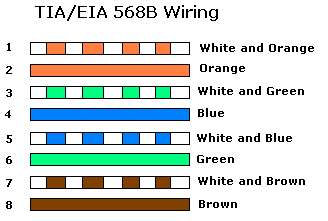
Ethernet cabling are available in three models:
- Straight through cable
- Crossover Cable
- Rolled cable
Straight Through Cable:
The straight through cable is used to connect

- Host to Switch or Hub
- Router to Switch or Hub
Crossover Cable:
The crossover cable can be used to connect
.jpg)
- Switch to switch
- Hub to hub
- Host to host
- Hub to switch
- Router direct to host
Rolled Cable:
Rolled cable is used to connect host to a router console serial communication protocol.
.jpg)
Wireless Networking:
In the wireless networking there are different types, as mentioned below:
- Narrowband wireless LANs
- Personal Communication Services (PCS)
- Narrowband PCS
- Broadband PCS
- Infrared Wireless LANs
- Spread Spectrum Wireless LANs
- Satellite
802.11b WLANs have a total bandwidth of up to 11 Mbps and are considered as “Wi-Fi” (Wireless Fidelity).

Data Encapsulation:
When a host transmits data across a network to another device, the data goes through encapsulation. Each layer communicates only with its peer layer on the receiving device.

At a transmitting device, the data encapsulation method works like this:
- User information is converted to data for transmission on the network.
- Data is converted to segments and a reliable connection is set up between the transmitting and receiving hosts.
- Segments are converted to packets or data-grams, and a logical address is placed in the header so each packet can be routed through an internetwork.
- Packets or datagrams are converted to frames for transmission on the local network. Hardware (Ethernet) addresses are used to uniquely identify hosts on a local network segment.
- Frames are converted to bits, and a digital encoding and clocking scheme is used.
 |
| PDU and Layer addressing |
 |
| Port Numbers at transport Layer |
The Cisco Three-Layer Hierarchical Model:
The Cisco hierarchical model can help you design, implement, and maintain a scalable, reliable,
cost-effective hierarchical internetwork. Cisco defines three layers of hierarchy.
 |
| Cisco Hierarchical Model |
The following are the three layers and their typical functions:
- The core layer: Backbone
- The distribution layer: Routing
- The access layer: Switching
The Core Layer:
The core layer is literally the core of the network, the core layer is responsible for transporting large amounts of traffic both reliably and quickly. If there is a failure in the core, every single user can be effected. Therefore, fault tolerance at this layer is an issue.
Do not:
- Don’t do anything to slow down traffic. This includes using access lists, routing between virtual local area networks (VLANs), and packet filtering.
- Don’t support workgroup access here.
- Avoid expanding the core (i.e., adding routers) when the internetwork grows. If performance becomes an issue in the core, give preference to upgrades over expansion.
Do:
- Design the core for high reliability. Consider data-link technologies that facilitate both speed and redundancy, such as FDDI, Fast Ethernet (with redundant links), or even ATM.
- Design with speed in mind. The core should have very little latency.
- Select routing protocols with lower convergence times. Fast and redundant data-link connectivity is no help if your routing tables are shot!
The Distribution Layer:
The distribution layer is sometimes referred to as the workgroup layer and is the communication point between the access layer and the core. The primary functions of the distribution layer are to provide routing, filtering, and WAN access and to determine how packets can access the core, if needed. The distribution layer is the place to implement policies for the network.
Do:
- Routing
- Implementation of tools such as access lists, of packet filtering, and of queuing
- Implementation of security and network policies, including address translation and firewalls
- Redistribution between routing protocols, including static routing
- Routing between VLANs and other workgroup support functions
- Definitions of broadcast and multicast domains
The Access Layer:
The access layer controls user and workgroup access to internetwork resources. The access layer is sometimes referred to as the desktop layer. This is a layered approach.
Do:
- Continued (from distribution layer) access control and policies
- Creation of separate collision domains (segmentation)
- Workgroup connectivity into the distribution layer


 Posts
Posts


No comments:
Post a Comment